전체 목차
- 쿠버네티스 클러스터 #1.Ubuntu OS 설치 및 설정
- 쿠버네티스 클러스터 #2 시스템 설정
- 쿠버네티스 클러스터 #3 쿠버네티스 설치 및 설정
- 쿠버네티스 클러스터 #4 로컬 Docker Disktop 설치 및 설정
- 쿠버네티스 클러스터 #5 Spring boot 어플리케이션 배포
- 쿠버네티스 클러스터 #6 node 및 pod 설정 점검
- 쿠버네티스 클러스터 #7 안전한 시작, 종료 스크립트
- 쿠버네티스 클러스터 #8 Spring boot 로그 확인
- 쿠버네티스 클러스터 #9 CI/CD 적용
- 쿠버네티스 클러스터 #번외1 Github CLI 활용
- 쿠버네티스 클러스터 #번외2 React Web - Springboot API 연동 (Gemini CLI 활용)
시작 하며
오래된 제온서버와 라즈베리파이 3대로 작은 서비스를 운영 할 수 있는 쿠버네티스 환경을 구축해 보았습니다.
OS 설치 부터 네트워크 구성, 쿠버네티스 클러스서 구성, 도커 연계, 간단한 Spring boot 앱 배포, Git Hub Actions 와 도커를 연개해서 지속적인 배포, 제온서버와 라즈베리파이 3대로 작은 서비스를 운영 할 수 있는 쿠버네티스 환경을 구축해 보았습니다.
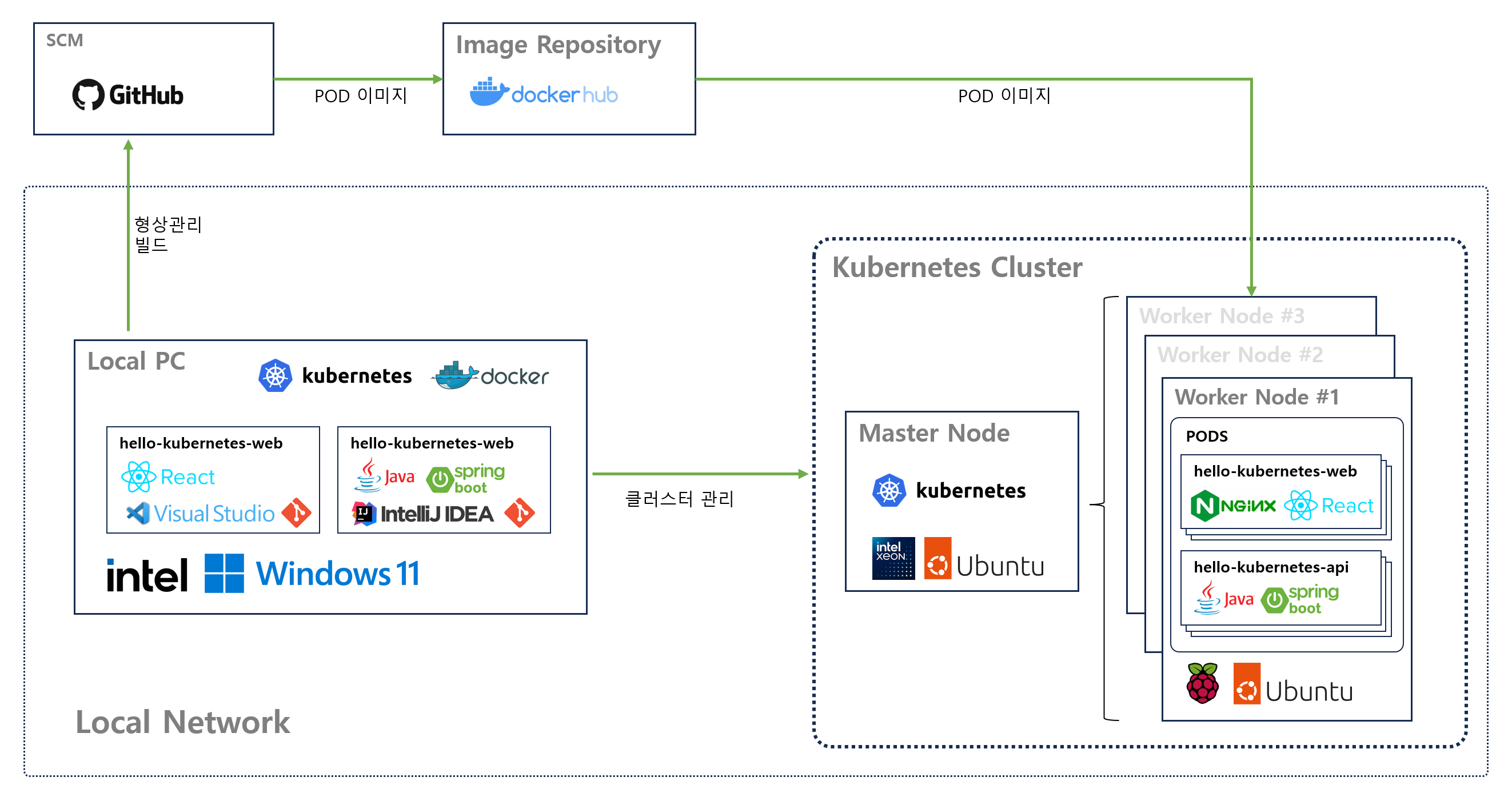
OS 설치 부터 네트워크 구성, 쿠버네티스 클러스서 구성, 도커 연계, 간단한 Spring boot 앱 배포, Git Hub Actions 와 도커를 연개해서 Ci/CD 까지 구현해 보았습니다.
쿠버네티스 클러스터 테스트용 구성이지만, 제온 서버는 말할 것도 없고 라즈베리파이도 어플리케이션을 설계하기에 따라 동시접속자 수백명 정도가 사용하는 가벼운 서비스정도는 충분히 가능합니다.
1. 준비물
마스터 노드 : 1대
- CPU : Xeon E5 2680 V4
- RAM : 32G
- Storage : 512G SSD
워커노드 3대
- 라즈베리파이 5 8G
- Micro SD 카드 16G 이상 3개
개발 환경
- IntelliJ (Java 21)
- VSCode
- Docker Desktop
- Github CLI (선택)
외부 계정
- Github
- Dockerhub
CPU 아키텍쳐가 arm64(라즈베리파이) 와 amd64(Intel x86) 이종 교배로 빌드 및 배포 이미지 생성시 고려해야 할 점이 있습니다.
OS는 가장 많이 사용되는 Ubuntu 를 선택하였고 최신 LTS 버전인 Ubuntu 24.04 LTS을 선택했습니다.
어떤 시스템을 구축하든 LTS(Long Time Support) 버전을 선택하는 것은 장기적인 시스템 운영측면에서 중요한 고려사항입니다.
2. 마스터 노드 우분투 설치
Ubuntu 24.04.3 LTS 64bit minimize 설치
최소 설치라 텍스트 에디터가 아무것도 없음
vi 에디터 설치 (편의성에 따라 nano 에디터 무방)
$ sudo apt install -y vim
3. IP 고정
sudo vi /etc/netplan/50-cloud-init.yaml
network:
  version: 2
  renderer: networkd
  ethernets:
    enp7s0:                 # 인터페이스 명은 각자 다를 수 있습니다. 원래의던 인터페이스 명을 변경하면 안됩니다.
      dhcp4: no
      addresses:
        - 192.168.2.100/24  # 사용하실 사설 IP 및 범위는 각자 환경에 맞게 넣어 주세요
      routes:
        - to: default
          via: 192.168.2.1  # 환경에 맞는 디폴토 라우터 IP (보통은 공유기 IP)
      nameservers:
        addresses:
          - 8.8.8.8
          - 8.8.4.4
수정 완료 했으면
$ sudo netplan try명령으로 정합성을 확인해야 합니다. (문제가 없으면 Enter)
주의: 설정 파일에 오류가 있으면 해당 오류가 보여지고 중지 되지만 문법적으로 문제가 없는 경우 변경한 IP로 네트워크가 연결 됬다가 다시 원복되므로 SSH를 통해 접속된 경우는 접속이 끊어지고 잠깐동안 접속이 안됩니다. (1분 정도 기다리면 원래 IP로 복구됨)
잠깐 접속이 끊어진 시간(약 2분) 동안 변경할 IP로 접속이 가능하니 그사이에 제대로 적용 되는지 테스트 해보는 것을 권장합니다.
수정된 내용을 적용하고 제대로 ip가 할당 되었는지 확인합니다.
$ sudo netplan apply주의: SSH 연결이 끊어지고 변경한 IP로 영구 변경됨
네트워크 설정에 문제가 있는 경우 인터페이스가 다시 활성화 되지 않기 때문에 이런경우 콘솔에서 원인을 파악해야 합니다.옆에 서버가 있는 경우 키보드, 모니터를 연결해서 어떻게든 가능하지만, 데이터 센터 같은 원격지에 인터넷으로 연결되어 있는 경우 콘솔에서 복구를 하기 위해 서버가 있는 곳으로 가야 할 수도 있습니다.
reboot 후에 네트워크가 제대로 잡혔는지 확인합니다.
4. 워커 노드 (라즈베리파이 5 Ubuntu) 설치
Worker 노드로 이용할 라즈베리파이 5에 Ubuntu 설치는 아래 내용에 따로 정리 했습니다.
https://opensrc.tistory.com/281
라즈베리파이 5 OS 설치 (Raspberry Pi 5 OS Install with Raspberry Pi Imager v2.0.0)
1. 준비물- 라즈베리파이 5- Micro SD (32G 이상 권장) 2. 라즈베리파이 Imager 설치https://www.raspberrypi.com/software/ Raspberry Pi software – Raspberry PiFrom our operating system to our GitHub repos, explore the software that powers
opensrc.tistory.com
5. 패키지 업데이트 및 필수 패키지 설치
$ sudo apt update -y
... 생략 ...

$ sudo apt upgrade -y
... 생략 ...
방화벽 설치
$ sudo apt install ufw -y설치후 상태는 inactive로 설치됨
필수 패키지 설치
$ sudo apt install -y curl gnupg2 software-properties-common apt-transport-https ca-certificates net-tools
6. 모든 노드에 /etc/hosts 수정
모든 노드에서 hostname 을 인식 할 수 있도록 /etc/hosts 파일의 내용을 환경에 맞도록 수정
127.0.0.1 localhost

192.168.2.100 master
192.168.2.101 node1
192.168.2.102 node2
192.168.2.103 node3

# IPv6 설정은 쿠버네티스 환경에서 간섭을 줄이기 위해 모두 주석 처리
# The following lines are desirable for IPv6 capable hosts
#::1     ip6-localhost ip6-loopback
#fe00::0 ip6-localnet
#ff00::0 ip6-mcastprefix
#ff02::1 ip6-allnodes
#ff02::2 ip6-allrouters
IPv6 관련 설정은 쿠버네티스 환경에서 문제가 된 경험이 있어서 모두 주석처리 했습니다.
모든 노드에서 상호간 hostname 으로 ping 확인
$ ping master

$ ping node1

$ ping node2

$ ping node3
여기까지 쿠버네티스 마스터 노드와 워커노드 3개를 설치하기 위한 기본 준비는 완료 되었습니다.
끝.
'UNIX-Networking' 카테고리의 다른 글
| 쿠버네티스 클러스터 #3 - 쿠버네티스 설치 및 설정 (0) | 2025.12.19 |
|---|---|
| 쿠버네티스 클러스터 #2 - 시스템 설정 (0) | 2025.12.18 |
| [Ubuntu] 시간 동기화 서버 chrony 설치 (1) | 2025.07.20 |
| [AWS] EC2 추가, SK브로드밴드 이용하는 경우 outbound 22(ssh) port 차단 문제 (0) | 2025.04.29 |
| crontab 명령 중복 실행 방지 (0) | 2024.05.30 |